
One MCP Server to Rule All Your Projects Commands

If you run AI coding agents inside Docker containers or sandboxes, you already know the trade-off: the agent can do its thing safely, but some commands need to run on the actual machine — PlatformIO compile-flash-monitor cycles, Rust builds, database migrations, deployment pipelines. Giving the agent unrestricted shell access on the host is not an option.
I wanted a thin layer between the agent and my shell — something that lets me define exactly which commands are allowed and blocks everything else. And since I work across multiple repositories, I needed a single process to manage all of them. So I built exocommand.
The idea
Exocommand is a centralized TypeScript MCP server. You register projects with the CLI, each getting a unique access key and its own .exocommand YAML config listing the allowed commands.
# Create a config file in your project directory
bunx @fcannizzaro/exocommand init

# Register the project and get an access key
bunx @fcannizzaro/exocommand add .
A config file looks like this:
build:
  description: "Run the production build"
  command: "cargo build --release"

clippy:
  description: "Run clippy linter"
  command: "cargo clippy"

list-external:
  description: "List files in parent directory"
  command: "ls -a"
  cwd: ../
The server exposes two tools: listCommands() returns every command from the config, and execute(name, timeout?) runs one by name, streaming output back to the client.
How it works under the hood
The server loads all registered projects from ~/.exocommand/exocommand.db.json and watches each .exocommand file for changes — edit a config while running and connected clients are notified automatically.
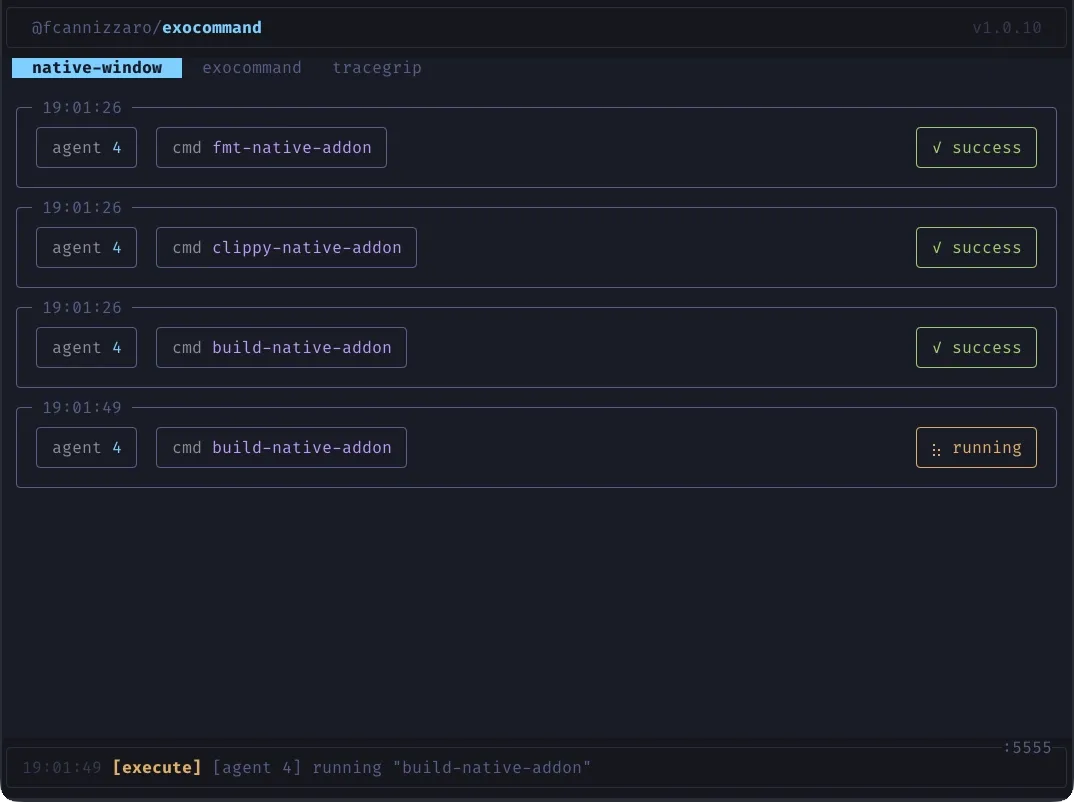
Key features:
- TUI dashboard — real-time terminal UI with project tabs, execution cards, and status indicators
- SSE streaming — stdout/stderr streamed line-by-line back to the client in real time
- Task mode — opt-in via
EXO_TASK_MODE, creates background tasks using the MCP experimental tasks API for crash-resilient workflows - Concurrent sessions — Streamable HTTP transport allows multiple MCP sessions across projects simultaneously
The port defaults to 5555 (override via EXO_PORT).
Setting it up
bunx @fcannizzaro/exocommand init    # create config
bunx @fcannizzaro/exocommand add .   # register project
bunx @fcannizzaro/exocommand         # start server
The server starts at http://127.0.0.1:5555/mcp. Point your MCP client at that endpoint with the exocommand-project header set to your access key:
{
  "mcp": {
    "exocommand": {
      "enabled": true,
      "type": "remote",
      "url": "http://host.docker.internal:5555/mcp",
      "headers": {
        "exocommand-project": "<access-key>"
      }
    }
  }
}
The URL uses host.docker.internal so agents running inside a Docker container or sandbox can reach the exocommand server on the host machine.
Source and docs are on GitHub.